Latest posts
Vortex on Ice
Apr 30, 2025 · by Andrew Duffy · 27 min read
If you follow this blog, you’ll be familiar with our open source next-gen file
format, Vortex. Vortex was built with an eye toward future
data workloads, but it also provides excellent performance on traditional OLAP
queries, consistently beating out Parquet in our DataFusion benchmarks for TPC-H
and ClickBench.
While we’re very proud of the novel ideas that go into Vortex, we’re most
excited about its potential to revolutionize data processing. Across sales calls
and conferences, we’ve been struck by the increasing adoption of
Apache Iceberg across the industry for both old
school analytics and new school AI/ML.
In March, we partnered with the
Microsoft Gray Systems Lab
to set out to build a tech demo to show Iceberg users how they can accelerate
their workloads using Vortex. We presented our results at Iceberg Summit in
early April of this year, and we wanted to share more information about how we
got to these results, ranging from our approach to building the integration all
the way to our experimental setup.
This is a bit longer than our usual posts, one we hope will serve as a detailed
record of the dragons slayed on the path to benchmark victory. Feel free to skip
ahead to the end if you just want to skim the results. Otherwise, grab your
trusty walking stick and get ready to go on an adventure.

Wither a table format?
The core of every
lakehouse system
is shared storage, usually in the form of cloud object stores such as S3 or
Azure Data Lake Storage. Lakehouses are meant to enable next-generation
workloads such as AI training and analytics to live alongside classical BI and
reporting workloads. Thus, unlike old-school proprietary data warehouses which
silo data behind a SQL-only interface, lakehouse systems want to make it easy to
get the data out and into the hands of a variety of downstream consumers.
What falls out of this is a new warehouse paradigm where absolutely
everything is stored as a collection of files in open formats, the most
popular of which being Apache Parquet.
The astute among you may notice that this sounds very similar to a data
lake. Data lakes have a perennial problem, which I’ll call “how the hell do I
make sense of this giant pile of files??”
As an example, say I have an object storage bucket containing 100,000
observability traces from my production servers. Maybe you’re training an ML
model to predict capacity needs for your fleet, so you want to retrieve a
dataframe of all events for my hosts in
eu-west-1 between
2025-03-27T00:00:00.00Z and 2025-03-27T01:30:00.00Z. You also want to setup
an hourly job to dump new log events into the lakehouse. And maybe while you’re
at it, you want to change the record schema.Your first instinct might be to treat the bucket as one big ol’ shared drive.
Give every dataset a folder, upload new Parquet files into the folder.
And this probably works, for a bit. But you’ll quickly run into all the problems
that data lakes failed to solve:
-
Concurrent access: There is no mechanism for readers and writers to coordinate shared access, leading to data loss and bloated cloud spend
-
Schema on read: Schema validation is left to the reader, meaning they need to check the schemas of all data files themselves to form the superset of all fields. Schema breakages aren’t found until they’re too late, causing cascading pipeline failures that are difficult to pinpoint and fix
-
Many small files: Data freshness necessitates frequent appends into the lake, which even for a small cluster of a few dozen nodes you could be dealing with thousands of files every day, making your queries bottle-necked on slow file listing operations
This is where lakehouse systems require a second component: a table format.
Table formats provide a management layer over the object store, grouping
collections of files into logical tables that offer familiar relational
semantics such as **schema on write **and transaction management. You
can think of the table format as the missing link that brings sanity and
governance to the lake.
Over the past decade, a slew of competing table standards have cropped up, most
of which were spun out of large tech companies as they built tools to tame their
massive data lakes. Recently, a clear winner has emerged in
Apache Iceberg. Iceberg has gained adoption as
the most fully-featured and vendor-neutral option, with teams at Apple, Netflix,
Microsoft, Airbnb and many others adopting it for their own internal warehousing
needs. Even proprietary warehouses like
Snowflake and
Google BigQuery
have raced to announce integrations, while
AWS
and Cloudflare have
each announced new public APIs that meet the Iceberg specification for their
storage customers.
Iceberg Mechanics
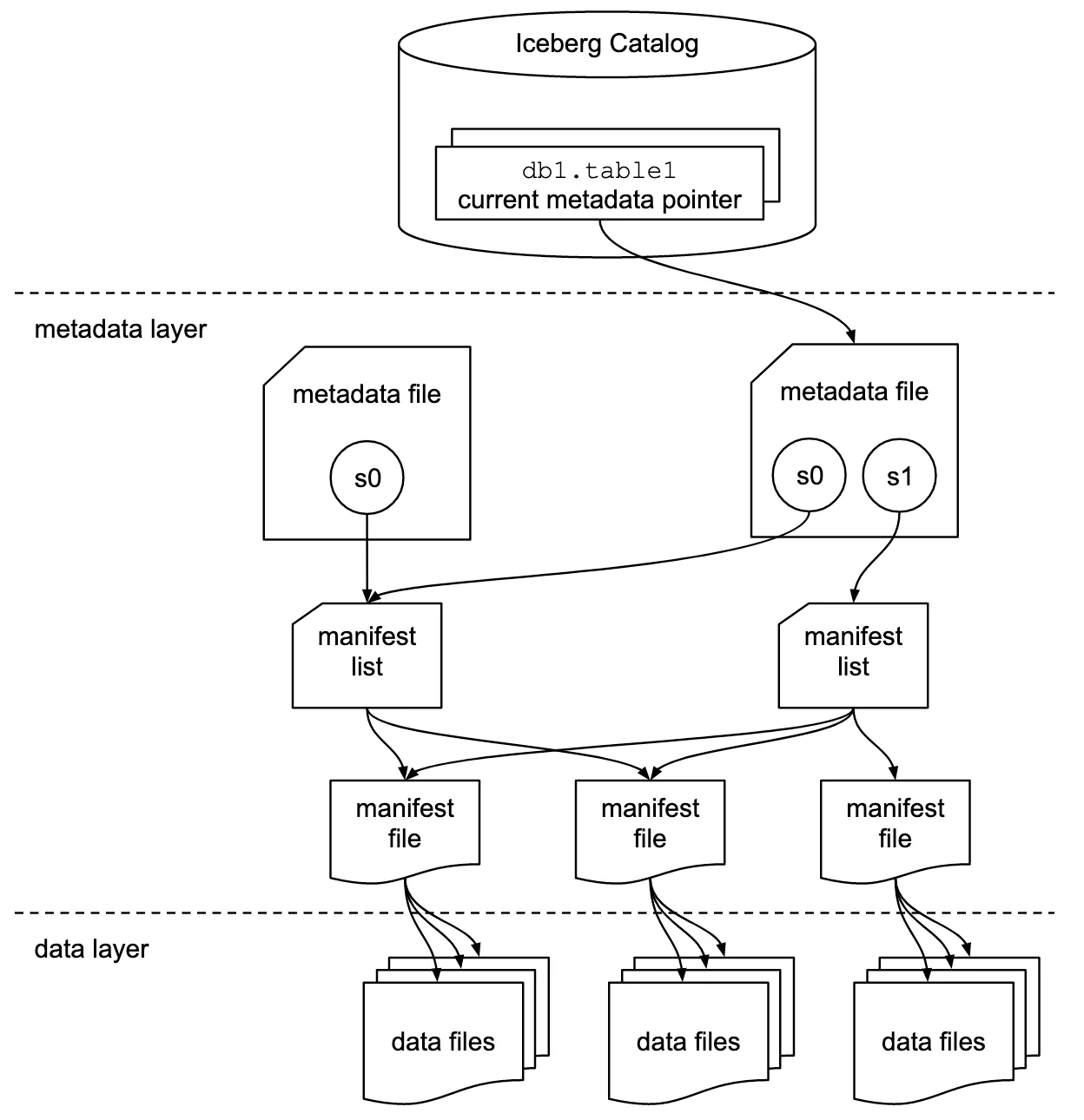
At its core, the Iceberg format is broken down into three layers
-
Catalog
-
Metadata files
-
Data files
Every new write transaction emits several manifest files recording metadata
about the files written, such as record counts and some summary statistics.
These are further summarized into a manifest list which is part of a
metadata file. A client who wishes to read the table starts from a metadata
file, traversing the manifest lists and manifests to discover the set of visible
files for the query. There can be several available snapshots at a given point
in time, allowing you to configure time travel and branch semantics in your own
Iceberg deployment.
The catalog sits in front of all metadata and manifest files, providing a
central way to create, read, update, and delete Iceberg tables. Iceberg defines
a
REST Catalog Specification
that enables both open and closed players alike to expose their data in an
Iceberg-compatible fashion. Providers like Amazon S3 and Cloudflare R2 offer
managed catalogs directly on top of storage buckets, but there are also a
variety of open providers such as Nessie and
Apache Polaris.
The lowest-level component in this architecture are the data files themselves.
You know, the files actually containing all of your taxi, citibike, lineitem,
and click data. Iceberg allows clients to write data files as Parquet, ORC or
Avro, and this decision is currently
hard-coded
into the core Iceberg codebase. All file IO for supported file types and storage
backends is required to live in the main Iceberg codebase as well, posing
challenges for us as file format authors that we’ll discuss in the next few
sections.
Decoupling the Iceberg
Currently, extending the supported formats in Iceberg is a difficult and
invasive process, but there’s been work to improve the status quo.
There’s an open pull request
from project PMC and Microsoft engineer Péter Váry that seeks to both cleanup
the file format logic while at the same time making it easier to extend the set
of builtin formats.
To understand why this is necessary, it’s helpful to understand a bit about how
the core Iceberg Java implementation works. Fundamentally, Iceberg is a table
format that allows file scans over its supported data file formats. These
scans can be initiated from one of many supported query engines, and to
improve performance they may even want to pushdown predicates and projections to
reduce the amount of data read.
When scanning a file, each format needs to specify the in-memory format that
batches get read into, for example the
ReadSupport
interface in Parquet. As an example, say that we wish to initiate a data scan of
an Iceberg table consisting of ORC files, each with fields
(X Y Z), and we’d
like to execute the query SELECT Y, Z FROM table WHERE X = 3 using Apache
Spark SQL. The sequence of steps that Iceberg internally executes looks
something like-
Convert the Spark filter expression
X = 3into an equivalent Iceberg expression. -
Traverse all manifest files reachable from the current snapshot to identify all ORC data files visible for the query. If your files are partitioned, this also requires converting the Spark filter expression into an Iceberg filter expression that can be used to prune partitions.
-
Generate Spark tasks to scan each matched ORC file.
-
Convert the Iceberg filter expression into an ORC
SearchArgumentand pushdown the projectionY,Z. Wrap the resulting stream ofVectorizedRowBatchinto SparkColumnarBatchfor vectorized processing. -
Spark will re-apply the
X = 3predicate after the scan in case the pushed filter result was inexact.
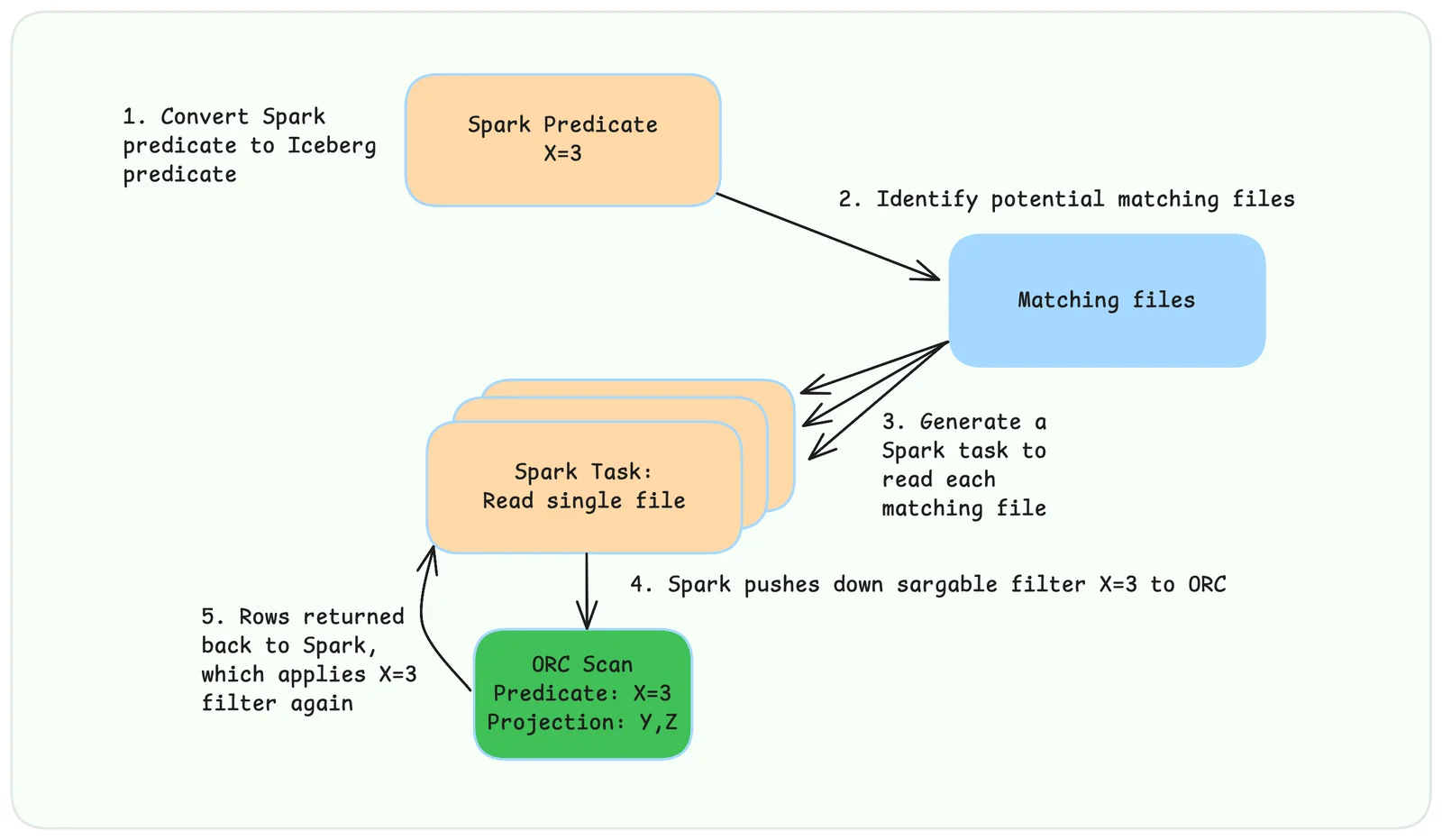
Every step in this process is specialized to a specific pair of file format and
execution engine.
The new interface promulgated by the PR seeks to streamline the process by
creating separate generic and engine-specific implementations for each file
format. We encourage interested readers to look directly at the PR discussion
for more details, as well as the
conversation on the mailing list.
We developed our own fork of Iceberg based on the PR that served as a basis for
all of our testing. We have focused on building a competitive vectorized Spark
reader for Vortex files that we put head-to-head with Iceberg’s vectorized
Parquet reader for Spark.
All the currently supported file formats have reference Java implementations,
Parquet, Avro and ORC and quite well-situated. There is just one problem: Vortex
is written in Rust! What should we do to implement support?
One option is to build fresh Java implementations of all of the Vortex
encodings, similar to how there are dozens of Parquet implementations out there.
However, one of the core project goals with Vortex was to
enable format evolvability ,
something Parquet has struggled with in part due to the lack of a single
reference implementation. As new features such as the Page Index or Bloom
Filters were added over time, different implementations pickup support for them
on different schedules, meaning it can take years to get the entire community to
coordinate on the rollout.
Another big reason to avoid rewriting the encodings in Java are to preserve
predictable performance. We go to great lengths in Vortex to optimize the
performance of our lightweight encodings. Care is taken to reduce unnecessary
allocations and code is profiled to make sure that it auto-vectorizes well
across common platforms. This level of control is only possible in a native
language like Rust. Java and the JVM’s builtin JIT provide a lot of power to
perform optimizations like this, but it quickly becomes
difficult to wield and reason about.
Thankfully, there is another option, one that allows us to bind our existing
library to Java directly!
Vortex and a cup of Joe ☕️
Java was first released in the 1990s at the height of Moore’s Law and the
coincident Cambrian Explosion of CPU architectures. It had the lofty goal of
freeing developers from the tedium of rebuilding their applications for every
available platform. It was trying to achieve the dream of being a “write-once,
run-anywhere” language, based on an advanced JIT virtual machine runtime that
could be run on any machine from a desktop computer all the way down to a
microcontroller.
Over time it became used for more than just GUIs, making its way into network
services and databases, and calling into native code became a necessity. In
release 1.3 they announced the
Java Native Interface
specification, which outlines how to bind class and instance methods to native
code.
This allowed you to write a Java classes like this
Java
package com.example.geo;

public class GeoLocation {
	public static native String formatLocation(
            long latitude,
            long longitude);
}
See the
native keyword on the method declaration? That tells the compiler that
the method is implemented by a shared library which will be loaded at runtime,
by a function with the following name and signatureC
#include <jni.h>

JNIEXPORT jstring JNICALL Java_com_example_geo_GeoLocation_formatLocation
  (JNIEnv *, jclass, jlong, jlong);
The C ABI is the secret sauce here, providing a lingua franca for calling
functions across languages that use the C function-calling convention.
There is a
jni Rust crate that wraps the JNI complexity a bit for us, allowing
you to write Rust functions similar to the C++ header we saw above:Rust
use jni::objects::{JClass, JString};
use jni::sys::{jlong, jstring};
use jni::JNIEnv;

// `no_mangle` ensures that the compiler leaves the symbols name intact.
#[unsafe(no_mangle)]
pub extern "system" fn Java_com_example_geo_GeoLocator_getAddress(
    env: JNIEnv,
    _class: JClass,
    lat: jlong,
    lon: jlong,
) -> jstring {
    let rust_string = format!("({lat}, {lon})", lat, lon);
    let output = env
          .new_string(rust_string)
          .expect("Couldn't create java string");
    output.into_raw()
}
Rust library crates generally build to
.rlib files, which can be consumed by
other Rust crates. But you can also enable building shared libraries by adding a
configuration to your Cargo.tomlTOML
[lib]
crate-type = ["cdylib"]
Alright, so we have established that we want to reuse our Rust implementation of
the Vortex format, and expose it to Java code via JNI. This leads to the next
problem, which is one of API design. As we sketched out earlier in the post, we
need to expose an interface to Iceberg that allows us to
-
Open a handle to a Vortex file, possibly with some parameters (e.g. the Azure credentials)
-
Create a new file scan with pushed projection and predicates
-
Export the scan result as a stream of Arrow batches to hand back to the parent Spark operator
Let’s start from the mindset of designing a Java API for this component. We
might define some
NativeFile class with a constructor that takes the
connection parameters, and provides a method to build a new scan. Perhaps
something like this:Java
public class NativeFile {
    private final URL url;

	public NativeFile(URL url) {
		this.url = url;
	}

	public void open() throws IOException {
		// Open a connection to Azure Data Lake Store using our URL
		// and properties.
	}

	// Create a new file scan, pushing the given Iceberg
    // predicate down to Vortex.
	public Scan newScanner(Expression predicate) {
		// ?
	}
}

// A Scan is just an iterator that yields Arrow columnar batches
public class Scan implements Iterator<ArrowColumnVector> {
	public Scan(ArrayIterator iterator) {
		this.iterator = iterator
	}

	@Override
	public void hasNext() {
		return iterator.hasNext();
	}

	@Override
	public ArrowColumnVector next() {
		return iterator.next();
	}
}
Seems simple enough! Let’s try and implement the
open method on NativeFile.
In Rust, we have a
VortexFile,
so we just want to build one of those, save it as an instance variable, and…Wait a minute. We can’t save a Rust struct in Java! What would its type be?
We need to build Rust objects, and pass a handle to them back over the FFI to
Java. The way we pass a handle from Rust to another language is to pass a
pointer to something with a
’static lifetime. The easiest way to create an
object with a 'static lifetime is to heap-allocate it, which in Rust means
putting it inside of a Box<T>. A Box is just a wrapper around a memory
allocation, and in Java a pointer is just another long (or a
jlong in jni crate
parlance). We can use
Box::into_raw
to unwrap our allocation into its raw pointer form, and pass the address as the
return value of the Java method.So here’s our Java code for opening a file:
Java
public final class NativeFileMethods {
    // This class only defines static methods, and should never
    // be instantiated by a call to `new`. Making its constructor
    // private prevents it from accidentally being used in ways
    // we didn't intend.
    private NativeFileMethods() {}

    /**
     * Open a file using the native library with the provided URI
     * and options.
     *
     * @param uri     The URI of the file to open.
     *                e.g. "file://path/to/file".
     * @param options A map of options to provide for opening
     *                the file.
     * @return A native pointer to the opened file.
     *         This will be 0 if the open call failed.
     */
    public static native long open(
        String uri,
        Map<String, String> options
    );
}
And here’s our Rust code
Rust
/// Native implementation for dev.vortex.jni.NativeFileMethods.open()
#[unsafe(no_mangle)]
pub extern "system" fn Java_dev_vortex_jni_NativeFileMethods_open(
    mut env: JNIEnv,
    _class: JClass,
    uri: JString,
    options: JObject,
) -> jlong {
    // try_or_throw is a helper that runs a closure that returns a Result,
	// and if it returns an error it throws it as a RuntimeExcpetion
	// back to the JVM.
    try_or_throw(&mut env, |env| {
		// Copy the string from the Java heap to Rust heap
        let file_path: String = env.get_string(&uri)?.into();

        let Ok(url) = Url::parse(&file_path) else {
            throw_runtime!("Invalid URL: {file_path}");
        };

		// Some helper to make the ObjectStore for the URL
        let store = make_object_store(&url)?;

        // block_on is a helper to execute a future in a blocking fashion
        // on the current thread.
        let open_file = block_on(
            "VortexOpenOptions.open()",
            VortexOpenOptions::file().open_object_store(
                &store,
                url.path()
            ),
        )?;

		// Put the VortexFile onto the native heap, and return
		// the raw pointer to the caller as a Java long.
        Ok(Box::new(open_file).into_raw())
    })
}
But wait a minute:
Box depends on its Drop impl to cleanup the memory it
allocated, so by turning it into a raw pointer and consuming the Box, we have
leaked this memory! Luckily, Box provides an unsafe
from_raw
function that can turn a raw pointer returned from an earlier call to
Box::into_raw back into a Box<T>, which can then get dropped, freeing the
native memory.This is a simple matter of adding a
close method in Java:Java
    /**
     * Close the file associated with the given pointer.
     *
     * @param pointer The native pointer to a file.
     */
    public static native void close(long pointer);
And Rust:
Rust
#[unsafe(no_mangle)]
pub extern "system" fn Java_dev_vortex_jni_NativeFileMethods_close(
    _env: JNIEnv,
    _class: JClass,
    pointer: jlong,
) {
	// SAFETY: the pointer MUST be a value returned from a previous
	// call to NativeFileMethods.open() and be non-zero.
    drop(unsafe { Box::from_raw(pointer as *mut VortexFile) });
}
This works, but in the process, we’ve effectively turned this Java class into a
thin layer over
malloc / free. This is to some degree unavoidable: the Java
class that owns the pointer now needs to manually manage its lifetime. However,
history has shown that manual memory management is hard and when done poorly,
can lead to all sorts of bugs.The
NativeFileMethods class is a footgun, ideally we’d hide it so that it’s
not generally accessible, and instead provide some porcelain interface that
makes it clear how to use correctly. Ideally such an interface would also
prevent memory-unsafe operations, into throwing Java exceptions when a memory
corruption would’ve otherwise ocurred.Here’s what we can do: we create a new
JNIFile wrapper class, that is much
closer to the original VortexFile Java class we wrote at the beginning of this
section. It has a constructor that receives arguments to open a file, and saves
the native pointer. Crucially, rather than saving it as a long, it uses
OptionalLong. Something like thisJava
public final class JNIFile {
	private OptionalLong pointer;

	public JNIFile(String uri) {
		this.pointer = OptionalLong.of(NativeFileMethods.open(uri));
	}
}
Now, there’s a neat trick this enables: we can make
JNIFile implement
AutoCloseable,
and tie the lifetime of the pointee to the lifetime of the object from the time
is it constructed up until it is closed. Our implementation of the close()
method will free the native memory, and empty the OptionalLong. The lifecycle
now looks like-
Create a
new JNIFile, also creating native resources like memory allocations, network sockets -
Use it to read data
-
Call
JNIFile.close(), freeing the native resources and marking the pointer as anOptionalLong.empty()
Any attempt to use the pointer will go through
OptionalLong.getAsLong, which
will return a NullPointerException if it’s empty. We’ve turned operations that
would have resulted in either a double-free or use-after free into a Java
exception, allowing us to preserve some semblance of memory safety even outside
of Rust.Let’s imagine for example that there is another
long NativeFileMethods.rowCount(long pointer) that returns the number of rows
in the file. By forcing an unwrap of our pointer, we’ll prevent runtime usage of
the JNIFile after it’s been closed:Java
public final class JNIFile implements AutoCloseable {
	private OptionalLong pointer;

	public JNIFile(String uri) {
		this.pointer = OptionalLong.of(NativeFileMethods.open(uri));
	}

	public long getRowCount() {
		// pointer.getAsLong() will throw NoSuchElementException if
		// this method is called after close was called.
		return NativeFileMethods.rowCount(pointer.getAsLong());
	}

	@Override
	public void close() {
		// This will throw an exception if close has
        // already been called.
		NativeFileMethods.close(pointer.getAsLong());

		// Clear the pointer handle, preventing
        // access to the freed memory.
		pointer = OptionalLong.empty();
	}
}
We found this to be a fairly productive pattern to use when implementing code
that crosses the Rust/Java boundary, and was the basis for our Iceberg
integration.
Benchmarking the integration
Our benchmarking setup was done on Azure using an
E8ads Virtual Machine with 8
cores and 64GB of memory, the same VM profile used for the
LST-Bench evaluations. We ran a single-node
Spark configured with-
Statically allocated 31GB of JVM driver memory
-
8 driver cores
We used the TPC-H dataset at scale factor 100. Data was stored in an Azure Data
Lake StorageV2 container in the same region as the VM.
We took the
DuckDB TPC-H dataset
and exported it to Parquet, with the following settings:
-
Maximum size 1GB
-
Row group size 512MiB
-
Page index enabled
For every Parquet file, we generated an equivalent Vortex file using default
compressor settings using the
vx CLI tool.The JAR was built of our
test harness code and uploaded to
the cluster via
spark-submit , which warms the SparkContext before running the
full test suite for both Vortex and Parquet.The first run, we were mainly neck-and-neck with Parquet, but for large joins
such as Q9 we were up to 2x slower. What gives?
We pulled up our profiler while the query was executing and noticed that all of
our task stack traces looked something like this:
Java
java.base@17.0.14/sun.nio.ch.FileDispatcherImpl.write0(Native Method)
java.base@17.0.14/sun.nio.ch.FileDispatcherImpl.write(FileDispatcherImpl.java:62)
java.base@17.0.14/sun.nio.ch.IOUtil.writeFromNativeBuffer(IOUtil.java:132)
java.base@17.0.14/sun.nio.ch.IOUtil.write(IOUtil.java:76)
java.base@17.0.14/sun.nio.ch.IOUtil.write(IOUtil.java:67)
java.base@17.0.14/sun.nio.ch.FileChannelImpl.write(FileChannelImpl.java:288) => holding Monitor(java.lang.Object@439399089)
java.base@17.0.14/sun.nio.ch.FileChannelImpl.transferToTrustedChannel(FileChannelImpl.java:605)
java.base@17.0.14/sun.nio.ch.FileChannelImpl.transferTo(FileChannelImpl.java:699)
app//org.apache.spark.util.Utils$.copyFileStreamNIO(Utils.scala:346)
app//org.apache.spark.util.Utils.copyFileStreamNIO(Utils.scala)
app//org.apache.spark.shuffle.sort.UnsafeShuffleWriter.mergeSpillsWithTransferTo(UnsafeShuffleWriter.java:465)
app//org.apache.spark.shuffle.sort.UnsafeShuffleWriter.mergeSpillsUsingStandardWriter(UnsafeShuffleWriter.java:321)
app//org.apache.spark.shuffle.sort.UnsafeShuffleWriter.mergeSpills(UnsafeShuffleWriter.java:288)
app//org.apache.spark.shuffle.sort.UnsafeShuffleWriter.closeAndWriteOutput(UnsafeShuffleWriter.java:224)
app//org.apache.spark.shuffle.sort.UnsafeShuffleWriter.write(UnsafeShuffleWriter.java:182)
app//org.apache.spark.shuffle.ShuffleWriteProcessor.write(ShuffleWriteProcessor.scala:59)
app//org.apache.spark.scheduler.ShuffleMapTask.runTask(ShuffleMapTask.scala:104)
app//org.apache.spark.scheduler.ShuffleMapTask.runTask(ShuffleMapTask.scala:54)
app//org.apache.spark.TaskContext.runTaskWithListeners(TaskContext.scala:166)
app//org.apache.spark.scheduler.Task.run(Task.scala:141)
app//org.apache.spark.executor.Executor$TaskRunner.$anonfun$run$4(Executor.scala:620)
app//org.apache.spark.executor.Executor$TaskRunner$$Lambda$2794/0x000072c48cea47e0.apply(Unknown Source)
app//org.apache.spark.util.SparkErrorUtils.tryWithSafeFinally(SparkErrorUtils.scala:64)
app//org.apache.spark.util.SparkErrorUtils.tryWithSafeFinally$(SparkErrorUtils.scala:61)
app//org.apache.spark.util.Utils$.tryWithSafeFinally(Utils.scala:94)
app//org.apache.spark.executor.Executor$TaskRunner.run(Executor.scala:623)
java.base@17.0.14/java.util.concurrent.ThreadPoolExecutor.runWorker(ThreadPoolExecutor.java:1136)
java.base@17.0.14/java.util.concurrent.ThreadPoolExecutor$Worker.run(ThreadPoolExecutor.java:635)
java.base@17.0.14/java.lang.Thread.run(Thread.java:840)
It’s not even in our code at all! So what’s happening?
It all goes back to Iceberg’s idea of file “splittability”. When Iceberg plans
to read a bunch of files to execute the query, it first checks to see if the
files are in a splittable format. If they’re splittable, they divide it up into
roughly evenly sized byte ranges, and create one Spark task to read the data
from each byte range. This works for Parquet and other pure PAX formats because
a set of column chunks forms a contiguous region in the file. In Vortex,
however, that’s not the case. We achieve parallelism via our
flexible Layout mechanism,
which does not align horizontal splits as contiguous byte ranges, so we were
reporting Vortex as unsplittable. This forced Iceberg to plan a single task for
each Vortex file, each of which contained tens of millions of tuples. Because
our tuples are so large, this meant that the shuffle data needed to be
spilled to several files,
which were then merged at the end of the stage. This is an extremely slow
operation, one that is easily solved by planning smaller map tasks.
To address this, we added a new concept of
“row-splittability”,
that allows us to report desired row-splits rather than byte-range splits in
Iceberg metadata files. This enabled Spark to generate the same level of
parallelism for Vortex reads as it did for Parquet reads, leveling the playing
field.
Once we’d implemented our new row-splitting additions to the planner, we ran our
benchmarks again, and found much more enticing results!
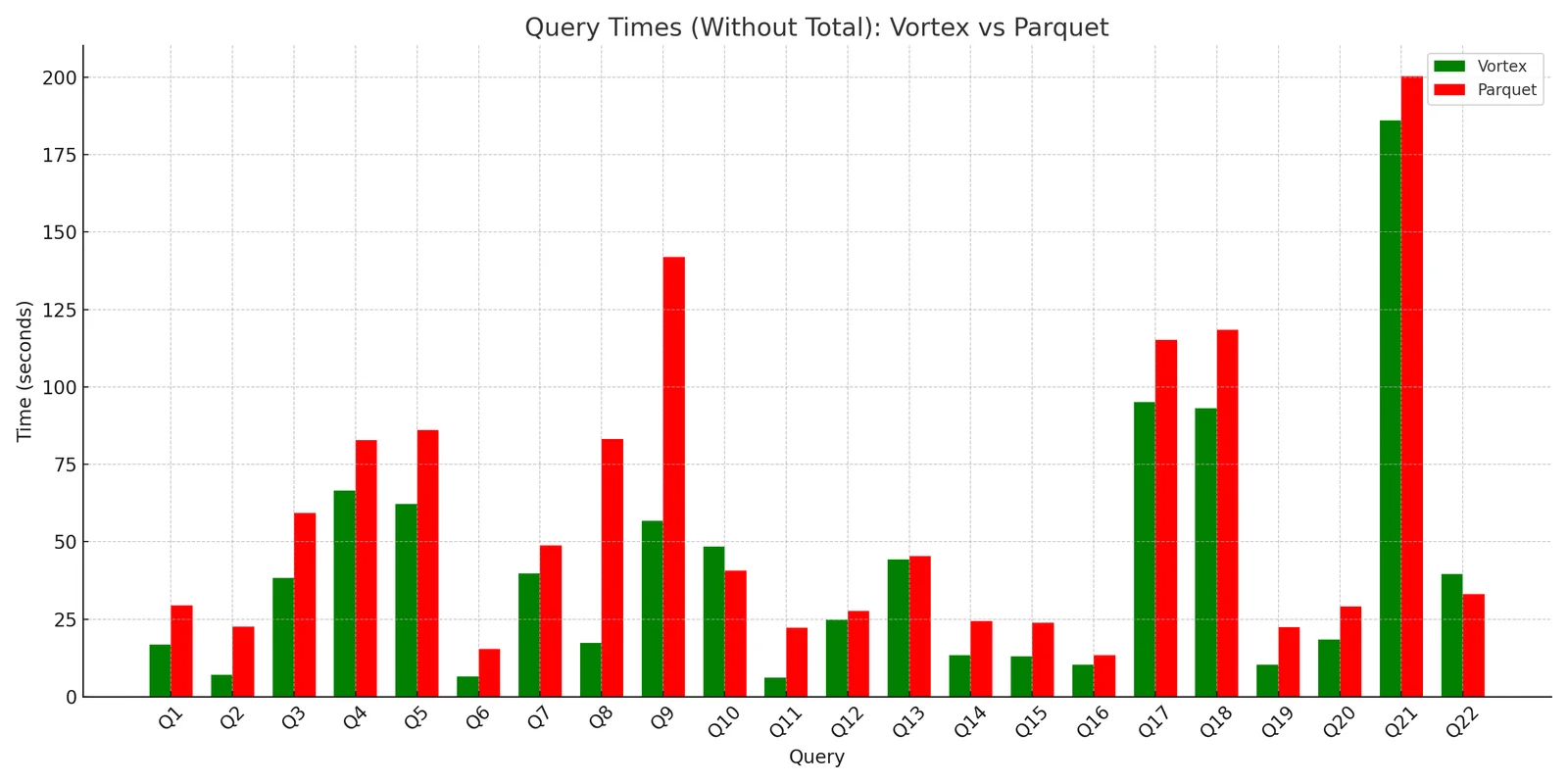
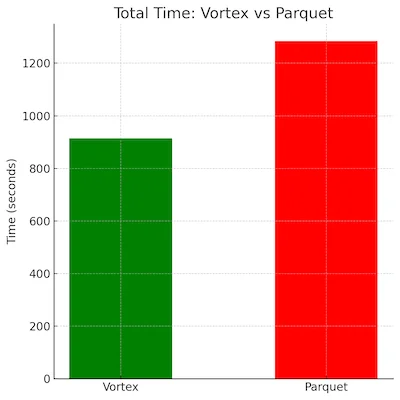
We were able to achieve a nearly 30% speedup on the whole suite, with
improvements of 2-4x for some of the slowest queries. Decoding into Arrow is
much faster with Vortex than Parquet due to its exclusive use of lightweight
compression methods and its Arrow-compatible in-memory format. We also benefit
from improved pruning due to our
granular zone maps,
allowing us to not only skip reading whole chunks, but actually selectively
decoding extents within a chunk.
The road goes ever on and on
We wanted to give a huge thanks to Péter Váry, Ashvin Agrawal, and Carlo Curino
from Microsoft Gray Systems Lab for their continued work on making Iceberg more
pluggable for the broader ecosystem, as well as for sponsoring our Azure test
cluster and answering our questions about Apache Iceberg along the way.
Getting to the demonstration was an exciting milestone, but there’s still so
much more to do, including
-
Implementing support for Deletion Vector pushdown into Vortex, allowing lightning-fast merge-on-read with scattered position deletes (in-progress PR)
-
Support for Iceberg-level encryption
If you’re excited about giving Vortex a shot in your Iceberg warehouse, please
reach out! Until then, stay frosty folks 🧊